



the short version
tencent just launched an international beta for a friendlier version of openclaw.
the install is getting commoditized.
the recurring money is moving one layer up, into scoping, hardening, and ongoing maintenance.
if you sell ai agent work for a living, the offer that makes sense right now looks very different from what most builders are quoting today.
below is what the news actually says, what the openclaw docs admit in writing, what to sell instead, how to price it, and what to walk away from.
what tencent just did
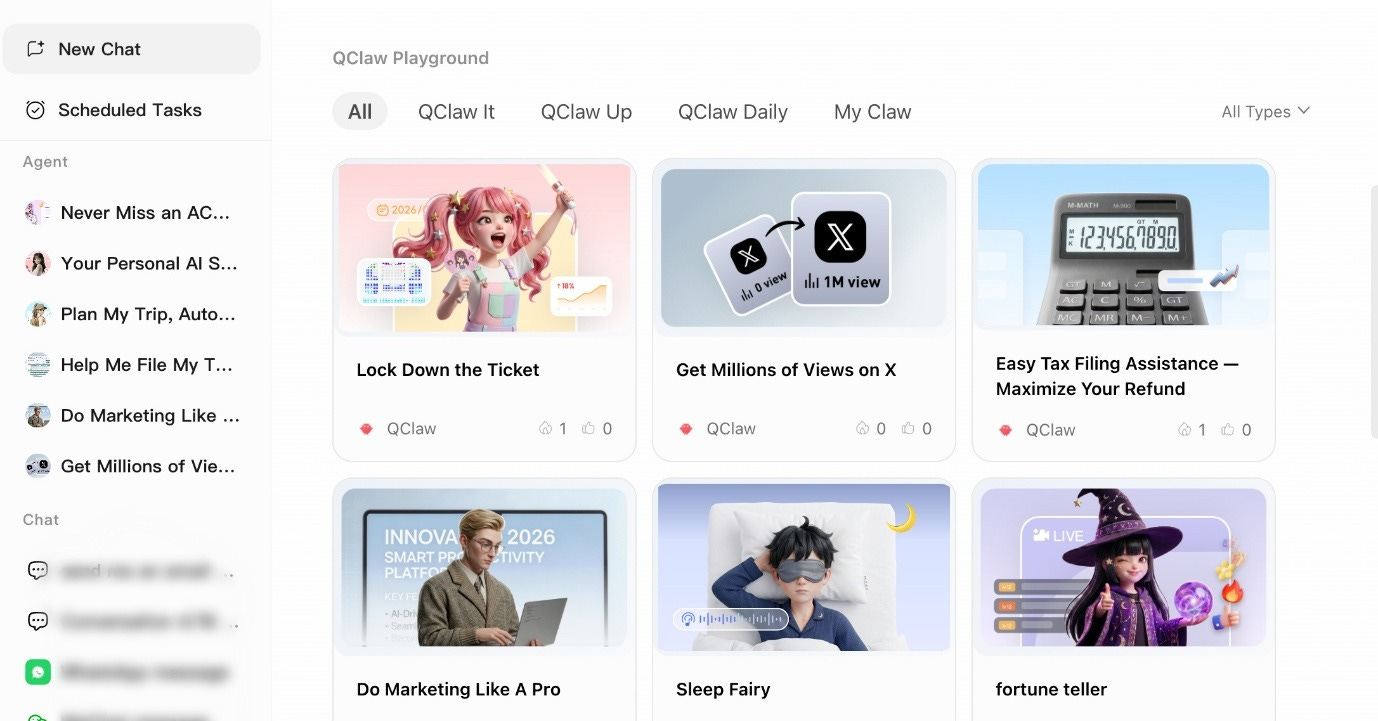
recently on april 21, tencent opened an international beta for a consumer ai product called qclaw.
the rollout is capped at 20,000 users across the u.s., canada, japan, singapore, and south korea.
the app installs on a laptop in about three minutes.
it comes pre-wired with several hosted ai models, accepts your own api keys if you’d rather bring your own, and connects to whatsapp or telegram so you can send instructions from your phone.
for anyone who hasn’t been following this space: openclaw is the open-source ai agent framework that went viral in china earlier this year.
it runs on your own computer, hooks into your messaging apps, and takes real actions on your behalf (drafting emails, moving files, handling follow-ups).
the raw version stops most non-technical people at the setup step because it needs command-line work to get running.
qclaw is tencent’s consumer wrapper around that same engine.
tap-to-install, preconfigured, no terminal required.
for people selling ai agent services, this is the signal worth reading.
what the money is telling us
a month before the international launch, reuters reported that tencent had already split its agent business by buyer type.
the consumer product is qclaw.
the developer product is a cloud service called lighthouse.
the enterprise product is called workbuddy.
on top of the three, tencent built a wechat plugin called clawbot that surfaces any of those agents inside an existing chat thread for over a billion monthly users.
when a company with tencent’s distribution segments that cleanly, the raw install stops being where margin lives.
packaging takes its place.
there’s a second signal, and it’s the one most builders missed because it ran inside china and never got picked up in english tech press outside of a few outlets.
in march, business insider and the south china morning post both reported on a strange two-sided economy that had formed around openclaw in china.
on one side, setup services.
people were paying installers up to 599 yuan (roughly $88) to set the tool up on their machine.
business insider reported that at least one installer claimed to have earned about $36,000 in a few days.
at tencent’s shenzhen headquarters, nearly a thousand people reportedly queued up to have engineers install openclaw on their devices for free.
on the other side, uninstall services.
once security concerns hit and the thing started breaking for people who didn’t know what they’d configured, paid uninstall listings appeared on xianyu (alibaba’s secondhand marketplace) at around 299 yuan ($44), with premium in-home removal going up to $87.
one rednote user summed up the whole market in a single line: “loading lobsters costs 599, unloading them costs 299.”
a market where real money flows at both the install boundary and the removal boundary is a market telling you, in the loudest voice it can, that the software itself is not the scarce resource.
scoping and cleanup are.
what the openclaw docs actually admit
none of the above is speculation.
openclaw’s own documentation is refreshingly blunt about its trust model.
for paid subscribers who want to check this themselves, every quote below is pulled verbatim from the public docs as of this week.
from docs.openclaw.ai/gateway/security:
OpenClaw security guidance assumes a personal assistant deployment: one trusted operator boundary, potentially many agents. Supported security posture: one user/trust boundary per gateway. Not a supported security boundary: one shared gateway/agent used by mutually untrusted or adversarial users.
in plain english: openclaw is built for one person on one machine.
it was never designed to serve several employees in a company who don’t fully trust each other.
the docs say that out loud.
next, the api.
openclaw exposes a compatibility endpoint so that other software can talk to it over http.
if you hand someone the bearer token for that endpoint, the docs instruct you to treat that person as a full operator of the gateway, with no reduced permissions available.
the official github security policy confirms this, stating that the openai-compatible endpoints “are documented full operator-access surfaces, not per-user/per-scope boundaries.”
a leaked token, for all practical purposes, is admin access to the whole system.
third, plugins.
this one surprises most people.
from openclaw’s github security.md:
Plugins/extensions are part of OpenClaw’s trusted computing base for a gateway. Installing or enabling a plugin grants it the same trust level as local code running on that gateway host.
and from the gateway security docs: “Plugins run in-process with the Gateway. Treat them as trusted code.”
there’s no sandbox between plugin and core.
a malicious plugin has the same reach as core code.
none of this is a bug.
it’s the correct design for the single-user single-machine case openclaw is actually built around.
the problem shows up the moment someone tries to squeeze three employees, two contractors, and a shared customer service inbox into one gateway.
the docs explicitly tell you not to do that.
qclaw and the wrappers coming behind it don’t move that boundary.
they just move it out of the first-time user’s view, which is worse.
and that is the opening for a builder who knows what to sell.
what you should actually be selling
the offer most builders are quoting right now is some version of “an ai employee” or “an ai workforce.”
that framing sounds impressive in a linkedin post.
it kills deals in a real sales call because business owners don’t buy abstractions.
they buy fixes to loops that are already costing them money.
here’s the offer that works in 2026, stripped to its parts.
a tightly scoped deployment.
one clear business job.
a required human approval step before anything external leaves the system.
a maintenance contract that keeps the thing stable past month one.
that’s it.
buyers are walking into your call because something specific is bleeding.
maybe an hvac owner is missing inbound quote requests because no one catches the phone in time.
maybe a mortgage broker is losing pre-approval buyers to slow email replies.
maybe a consultant’s admin retypes intake forms into salesforce every afternoon and it eats four hours a week.
these are concrete loops with dollar amounts attached.
they fit in a twenty-minute sales call.
“ai workforce” does not.
notice that tencent’s own launch framing supports the same pattern.
qclaw wasn’t marketed as autonomous intelligence.
it was marketed as tax prep, fitness planning, and social media management, all packaged into preconfigured use cases with three-minute deployment.
tencent understands that the buyer wants a solved problem, not a tool.
a real deployment with real numbers
let me walk through a specific shop you can use as a template for pricing conversations.
say you’re talking to a three-truck hvac company.
they do about $1.5 million a year in service revenue.
the owner still handles inbound lead intake personally because his dispatcher is overloaded and the answering service keeps missing nuance.
leads come in through the website form, through a google business profile listing, and through voicemails when no one grabs the phone.
by the owner’s own count, four to six leads a month slip through the cracks.
the average first-year value of a new hvac customer at this shop is around $1,400.
here’s the managed offer you build for him.
the system.
one gateway runs on a small vps (a rented cloud server) you manage.
it’s watching his form submissions and voicemail transcripts in real time.
when something new comes in, it drafts a response email within five minutes, builds a short prep packet that includes the address and approximate home age pulled from public records, creates a follow-up reminder on his calendar, and writes a draft customer record for his crm.
the guardrail.
none of it sends.
the owner taps approve on his phone before anything leaves the system.
that approval gate is the single most important feature of the whole deployment and it’s what separates your offer from every bad ai project he’s heard horror stories about.
the price.
$4,500 setup fee.
$1,500 a month on a six-month minimum.
the math.
assume the system catches three of the missed jobs per month at $1,400 first-year value each.
that’s $50,400 in recovered revenue over year one against $22,500 in total first-year fees.
a 2.2x return, and that’s before any lifetime value from repeat calls or a maintenance plan.
most hvac customers are worth a multiple of their first-year spend over time, so the real number is higher.
why the retainer holds.
the owner has zero interest in being the guy who fixes whatsapp authentication on a sunday morning when a session token rotates.
his renewal isn’t driven by feature envy.
it’s driven by not wanting to touch this.
the first sales call, scripted
the qualifying call is where a clean offer gets made or a messy one gets started.
these five questions will separate real buyers from polite tire-kickers within fifteen minutes.
1. what’s the one workflow where slow response or missed follow-up is costing you money this quarter?
if they can’t answer with something specific and dollar-attached, don’t send a proposal.
a deployment without a scoreboard gets graded on vibes, and vibes eat margin.
2. who on your team can approve outbound actions before they’re sent?
if there’s no named approver, the first bad output becomes the conversation where you get fired.
walk.
3. who owns the credentials and the host once we go live?
split ownership across the owner, the operations manager, and the it guy is a trap.
when something breaks at 2am, nobody is accountable and every resolution turns into a three-way meeting.
get a single name on this or don’t sell.
4. what data is off-limits inside this system, no matter what?
buyers who can’t give you an “absolutely not” list haven’t thought about it yet.
you’ll end up thinking about it for them, for free, in month three, under pressure.
5. if this saves you four hours a week, who on your team gets those hours back?
no named beneficiary means no internal champion, which usually means no renewal at month six regardless of how well the system performed.
buyers who answer these fast and concretely are worth a proposal that same day.
buyers who hedge on more than two are buyers who’ll generate unlimited scope creep at your expense.
proposals take a day to write.
send them only to the first group.
the cold pitch that books the call
for reaching out to a local business owner who has never heard of openclaw and never will:
hi [name], saw your team on [channel]. most operations your size are losing three to five leads a month to slow response time, which at your price point adds up to [$x] in revenue walking out the door. i build small, managed ai systems that watch your inbound channels, draft a response within five minutes, and put the follow-up on your calendar. nothing gets sent until you approve it from your phone. setup takes about two weeks and the system pays for itself by month two in most of my deployments. worth a twenty-minute call?
a few things worth noticing about this pitch.
the phrase “ai agent” appears nowhere.
it surfaces the approval gate on the second-to-last sentence, which is where the buyer’s anxiety lives.
it puts a dollar figure on the current bleed, which is how a business owner actually thinks about the problem.
and it asks for a call, not a sale.
keep it short.
rewrite the bracketed fields for the specific business.
don’t pitch features.
the retainer is where you actually get paid
setup fees come in once.
they’re lumpy and they tempt you into pricing the install like it’s the whole product.
it isn’t.
the business lives in the retainer, and the retainer is precisely the place qclaw and the other wrappers can’t compete.
a wrapper doesn’t call you back when authentication breaks on a weekend.
what the retainer should cover.
authentication and session repair when tokens expire.
plugin or channel re-validation after a vendor pushes an update.
a monthly security review.
backup verification.
workflow tuning inside the scope you both agreed on.
incident triage.
rollback support.
a monthly run of openclaw security audit --deep with a one-page plain-english summary you send the client.
what the retainer should explicitly not cover.
anything that expands the scope.
new workflows.
rollouts into new departments.
multi-user expansion.
custom plugin development.
new data source integrations.
these are separate engagements at separate rates.
write the exclusion list into the agreement in plain english before the first retainer check clears.
the single biggest reason managed retainers turn into charities by month three is that builders don’t define the boundary on paper and then feel awkward enforcing it later.
define it at signing and the awkward conversation never happens.
how to handle the month-two expansion request
this is where retainers die, so it gets its own section.
in month two, almost every happy client will say some version of: “hey, this is working great. can we also have it do [second workflow]?”
this is not a gift.
it’s a test.
the wrong answer is “sure, i’ll fold it in.”
the wrong answer trains the client to treat scope expansion as free.
by month six you’re working twice the hours for the same retainer, and you’ll quietly resent the client while they cheerfully renew.
the right answer has a shape.
something like:
glad you’re seeing the value. that second workflow is about [x] hours of new setup plus a modest retainer bump because it adds [y] to monthly monitoring. want me to send a short add-on scope document this week?
you just taught the client that scope expansion is paid.
they’ll either say yes and pay you more, or they’ll say “let me think about it” and come back in a month, by which point they’ll value what you already do more than they did.
the only clients who react badly to this script are the ones who were going to underpay you anyway.
you want to find that out in month two, not month twelve.
what to do in the first thirty days after signing
a beginner-level checklist you can literally print and tape above your desk:
day 1-3.
set up the vps.
install openclaw.
set openclaw.json with gateway auth using a long random bearer token, stored as an environment variable.
lock the bind to loopback unless you have a real reason otherwise.
run openclaw security audit --deep and resolve every critical finding before writing a single workflow.
day 4-7.
pair the agreed messaging channels (one at a time, never all at once).
confirm the client’s designated approver can receive and tap approve on pending actions from their phone.
document the approval flow in a one-page pdf the client can show to their insurance provider if asked.
day 8-14.
build the first workflow end to end.
test with fake inbound data, then test with real but low-stakes inbound data.
never enable outbound actions until the client has personally tapped approve on at least twenty drafts and is comfortable with the draft quality.
day 15-25.
flip the workflow live.
watch the first hundred approvals manually.
tune the drafting and prep-packet logic based on what the client is editing before approving.
this is where you earn your setup fee.
day 26-30.
write and send the first monthly audit summary.
schedule the month-two retainer call.
in that call, ask explicitly: “is there anything that’s annoying you that we haven’t already talked about?”
fix those before they become a reason to churn.
this checklist works for any vertical.
the specifics of the workflow change.
the rhythm doesn’t.
where this offer doesn’t work
not every buyer is a fit, and you’ll burn money trying to force the ones that aren’t.
the buyer who wants multiple departments on one gateway before the first workflow has earned trust is the most common bad fit.
the docs are unambiguous on shared-gateway trust.
you’ll spend your margin re-explaining that boundary instead of shipping.
the buyer who refuses to put a human in front of outbound actions is a harder pass.
the first bad output becomes a termination call.
no amount of downstream polish recovers from it.
the buyer who wants ownership of the host, credentials, and configuration split across three different people on their team, while still expecting you to be accountable for outcomes, makes every future incident unresolvable.
if you can’t consolidate the ownership during scoping, don’t sign.
the buyer who can’t name a specific painful loop is a buyer who’ll rate you on vibes.
there’s no winning that game.
a clean no in month zero is worth far more than a messy yes that turns into a churn in month six.
where this leaves you
the real land grab has nothing to do with who installs openclaw first.
that end of the market is already being eaten by qclaw and the wrappers coming behind it.
the position worth taking is one layer up.
it’s the work of scoping a deployment that matches the trust model in the docs, owning credentials on behalf of a client who doesn’t want to, picking up the phone when something breaks, and keeping the system boring and boring and boring for as long as the client is paying you to.
the wrappers can’t do that work.
the buyers who have been burned once (and there are more of them every month) already know they need someone who can.
the question is whether you’re positioned to be that someone before the next tencent builds its own qclaw for whatever vertical you’re targeting.
the three working assets below are the templates for the work.
use the decision matrix when you’re trying to figure out which path fits which buyer.
the retainer agreement is what you customize and put in front of a client once the first month has proven out.
the rescue intake is what you pull off the shelf the day a wrapper buyer calls in month three because something has gone sideways.