



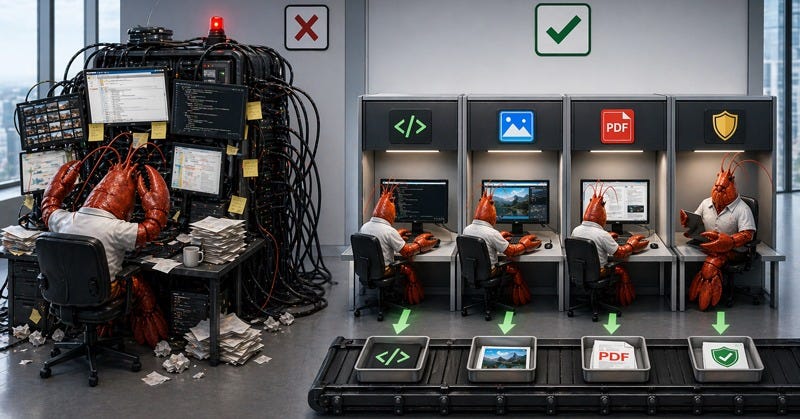
people keep asking me which local model they should be running, as if repo edits, screenshots, pdf extraction, and cheap repeat work are the same kind of task.
to start, openclaw’s own model-routing docs already say otherwise. the default model handles the main lane, imageModel is only used when the primary model can’t accept images, and pdfModel is used by the pdf tool, falling back to the image lane and then the default lane if you leave it unset. openclaw also still points people to openclaw onboard as the recommended setup path.
that matters because it changes what you’re optimizing for.
you’re not trying to find one local model that looks respectable in every screenshot comparison online. you’re trying to make the stack hold up on the jobs you actually give it.
if you’re new, the easiest way to think about this is simple.
a lane is just one model assigned to one kind of work.
that’s enough to get started here.
repo work is one lane. screenshots are another. pdfs are another. after that, keep a stronger fallback around for work that’s expensive to get wrong. openclaw’s own local-model guide still recommends keeping hosted fallbacks available with models.mode: "merge" even when you’re serious about local. it also says a single 24 gb gpu is only enough for lighter prompts with higher latency, and warns that aggressively quantized or smaller checkpoints raise prompt-injection risk.
the first models i’d actually test
for code, qwen3-coder-next (personal favorite) is one of the clearest first tests right now because its public card is unusually direct about what it’s for. qwen says it was built for coding agents and local development, with 80b total parameters, 3b activated, and training aimed at long-horizon reasoning, tool use, and recovery from execution failures. if your openclaw workflow lives in repos and terminals, that’s the kind of description you pay attention to.
for screenshots and documents, gemma 4 deserves a real slot in testing. google’s current launch post presents gemma 4 as a model family built for reasoning and agentic workflows, with native function calling and structured output support. the current model card says the family is multimodal, supports up to 256k context on the larger variants, and explicitly lists document and pdf parsing, screen and ui understanding, chart comprehension, and ocr among its image-understanding capabilities. google’s public launch post is dated april 2, 2026.
that split is more useful than the usual “best local model” argument because it matches how openclaw already routes work.
for code, start by testing qwen3-coder-next.
for screenshots, charts, receipts, and document-heavy visual reads, test gemma 4.
for pdfs, stop letting whatever happened to be loaded decide the answer.
the setup a beginner can actually finish
the biggest beginner mistake is not picking the wrong model.
it’s trying to design the whole stack before one task has succeeded.
start smaller.
install one local runtime. lm studio and ollama are both first-class paths in openclaw’s current provider docs, and openclaw onboard is still the fastest supported way to get model, auth, and defaults set in one flow. if you just want a first chat without channel setup, the onboarding docs point to openclaw dashboard for that too.
then pick one local default model for the work you do most often.
not the model you admire most.
not the model that won the most recent reddit thread.
the work you actually do.
if your day is mostly repo edits and shell steps, start with a code-focused model. if your day is mostly reading screenshots and dashboards, start with a visual model. then run one real task through it. a real file. a real screenshot. a real pdf.
after that, write down the miss in plain language.
did it lose repo state.
did it misread the screenshot.
did it turn a structured pdf into a fluffy summary.
did it crawl because the prompt was too heavy.
that gives a beginner something concrete to act on, and it gives an advanced user something better than vibes. now you know what failed and why you might need another lane.
before you paste config, get the model id right
this is the detail that quietly breaks a lot of first setups.
openclaw model refs use provider/model, and the current docs call out openclaw models list and openclaw models set <provider/model> as the helpers. lm studio adds one more wrinkle. its model keys use author/model-name, and openclaw prepends the provider name. so if lm studio reports qwen/qwen3.5-9b, openclaw wants lmstudio/qwen/qwen3.5-9b. the lm studio provider docs say you can confirm the exact key by calling http://localhost:1234/api/v1/models and reading the key field.
that sounds minor until you watch someone paste a display label instead of the real model key and spend the rest of the afternoon debugging the wrong thing.
why onboarding sometimes looks broken
this part is worth stating plainly because it catches people fast.
unless you pass --skip-health, openclaw onboard waits for a reachable local gateway before it exits successfully. if you use --install-daemon, onboarding starts the managed gateway install path first. without that flag, you need a local gateway already running, for example with openclaw gateway run. if you only want config writes and bootstrap setup, the docs say to use --skip-health.
so if onboarding appears to “hang,” that is not always a broken install. sometimes the gateway just was not up yet.
where people lose hours for no good reason
most wasted time in local openclaw setups comes from blaming the wrong layer.
openclaw’s general troubleshooting docs are blunt on this. if the backend says messages[].content should be a string, set models.providers.<provider>.models[].compat.requiresStringContent: true. if tiny direct requests work but normal openclaw agent turns still fail, the next documented move is models.providers.<provider>.models[].compat.supportsTools: false. if the backend still crashes only on larger openclaw turns after that, the docs say to treat the remaining problem as an upstream model or server limitation rather than an openclaw transport problem.
that boundary is important. it tells you when to stop poking config and start changing the backend, lowering prompt pressure, or trying a different model.
the ollama boundary that still trips people up
ollama supports openai compatibility now. its own docs say that directly. openclaw’s ollama docs say something different, but only in a different context. they warn remote ollama users not to use the /v1 openai-compatible url with openclaw because tool calling is not reliable there and models may print raw tool json as plain text. openclaw tells you to use the native ollama base url instead, without /v1. those two statements can both be true. one is about what ollama supports in general. the other is about what currently behaves well inside openclaw.
there is one more ollama detail that matters once you start editing config by hand.
when you let openclaw handle ollama the easy way, it can auto-discover models from the local instance. the current provider docs say that works when OLLAMA_API_KEY is set and you do not define models.providers.ollama. once you define models.providers.ollama explicitly, auto-discovery is skipped and you need to define models manually. that explains why some people think their model list disappeared the minute they “upgraded” to a custom config.
lm studio has a different kind of gotcha
lm studio’s newer developer docs recommend the native /api/v1/* rest api for new projects. openclaw’s current lm studio docs still show the openai-compatible /v1 base url in onboarding examples. that is not elegant, but it is the current state of the docs. inside openclaw, follow openclaw’s lm studio provider guide. if you are building directly against lm studio itself, their native api is now the preferred surface.
there is also a model-visibility issue that looks like a routing bug until you know what lm studio is doing.
the current lm studio headless docs say that when jit loading is on, /v1/models returns all downloaded models, not just the ones already loaded into memory. when jit loading is off, /v1/models returns only models currently loaded into memory, and you must load the model first before using it. that means “lm studio isn’t showing my model” is often not a missing-model problem at all. sometimes the model just is not loaded.
what i’d deploy today
i’d start with one local default lane and one stronger fallback.
the local lane should match the work you do most.
the fallback should be the model you trust when the answer touches production, customers, money, or some painful cleanup path.
then leave it alone long enough to fail honestly.
if repo work is fine and screenshots keep missing, add a visual lane.
if screenshots are fine and pdf extraction stays weak, add a pdf lane.
if everything is “kind of okay” but nothing is trustworthy, stop adding complexity and fix the first lane first.
that is not the neatest possible setup. it’s the setup most people can survive.